What Is a Digital Adoption Platform?
A digital adoption platform (DAP) is the enablement and measurement layer that sits on top of applications to help users complete workflows correctly. In large organizations, DAP value appears in three places: guided execution within the application that accelerates time-to-proficiency and eliminates user errors, in-app self-service support that reduces tickets, and analytics that demonstrate adoption, workflow performance, and overall digital value realization.
While there are 95 DAPs listed on G2, only 6 have a enterprise-led market share, with most focusing on mid-market and SMBs. An enterprise DAP can drive measurable ROI across departments and use cases, having down-stream effects across the organizations. Its key outcomes center on accelerated time-to-proficiency, reduction of support tickets, elimination of user errors, faster task completion, and improved customer experience.
DAP Uses Cases & Fit Signals
The table below highlights different use cases by buyer type, including fit signals and outcomes tied to each DAP use case:
The Enterprise ROI of a Digital Adoption Platform
Despite massive investments in software, the expected business value remains elusive for large organizations. Ineffective digital adoption alone is costing mid-sized firms an average of $10.9M annually, according to Forrester’s recent Driving Digital Adoption For Impactful Transformation And Growth report. Additionally, the relentless pace of change creates persistent challenges for users, hindering the adoption and integration of enterprise platforms and tools.
Our 2026 State of Digital Transformation ROI report quantified the impact of a DAP investment, comparing organizations that invest in a DAP to support their digital transformation goals vs. their peers who haven’t. The cohort that utilizes a DAP saw measurable improvements across the board vs the non-DAP cohort, including:
- 37.5% higher user proficiency after three months
- 64% faster time-to-value for digital transformation initiatives after six months
- 67% lift in overall ROI from digital transformation investments
To put this into perspective, for a $3M enterprise software investment, the average ROI (278%) would be $8,340,000. For those with a DAP, a 67% lift would drive that ROI to $13,980,000. And this is for one application deployment, with most modern digital enablement teams using a DAP like Whatfix across multiple high-value applications.
Features to Look For in an Enterprise-Grade Digital Adoption Platform
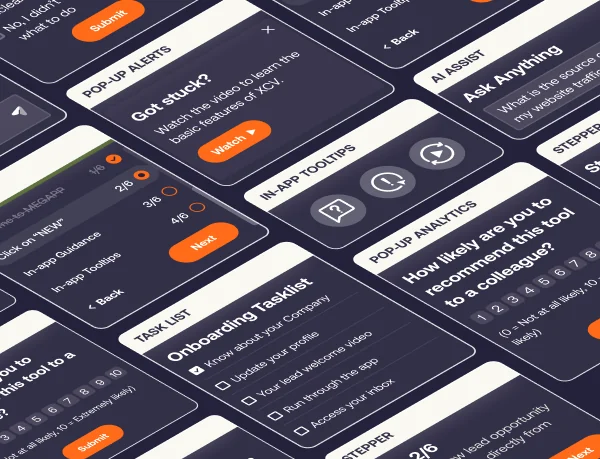
A true enterprise DAP goes far beyond simple walkthroughs. It includes multiple in-app experience types, like Flows, Smart Tips, Pop-Ups, Task Lists, and field-level guidance, that span complex cross-application workflows, adapt by role and behavior, and improve over time with AI-driven optimization.
Enterprise buyers also require disciplined, operationalized content lifecycle management capabilities that survive constant change. That means no-code authoring, governed draft-to-production workflows, auto-testing, version control, rollback, environment separation, content localization, and AI agents that help teams update guidance when workflows change, contextualize experiences for each user, and reduce the operating cost of keeping content current.
Self-service support is another core DAP category capability. An enterprise-grade DAP unifies help content and knowledge repositories, like SharePoint, Google Drive, SOPs, LMS courses, policies, and training assets, into an in-app help center where users can search without leaving the application, while AI summarizes results, recommends the most relevant resources, and guides users toward the right next step.
Comprehensive DAP platforms (like Whatfix) combine product analytics with adoption insights to surface friction points, drop-offs, and workflow bottlenecks. These insights are turned into targeted guidance, segmentation, and optimization actions inside underlying application, creating a closed-loop model for continuous improvement.
Whatfix pairs Mirror for pre-production simulation training and AI roleplay with in-workflow guidance, Self Help, content governance, and adoption analytics in one unified platform, giving enterprises a safer way to prepare users for regulated workflows, customer-facing interactions, and high-risk tasks before they ever enter live systems, and continue within live systems. This pre-production training, in-workflow guidance, and adoption analytics create a unified digital adoption layer powered by AI that measures business outcomes across the enterprise, and is how Whatfix separates itself from the rest of the DAP category.
What are the best digital adoption platforms for enterprise teams?
1. Whatfix
Details:
- Founded: 2014
- Similar to: WalkMe, Pendo
- Typical roles: Director of Enterprise Applications, Enterprise Application Owner, CIO staff, enablement lead, service desk manager
- Typical customers: 2,000+ employees, multi-region operations, mission-critical enterprise software, high-volume internal users, regulated industries with controlled or audited workflows
What Is Whatfix?
Whatfix DAP is an enterprise-grade digital adoption platform built to maximize ROI from mission-critical applications and accelerate digital transformation value realization. It drives measurable outcomes through contextual in-app guidance, self-service support, and adoption analytics tied to workflow performance.
Whatfix provides comprehensive product analytics to enable a data-driven, closed-loop feedback approach to optimize workflows, new content creation, and adoption milestones. With Mirror simulation training and AI roleplay, Whatfix is the only end-to-end digital adoption solution for pre-production readiness, in-workflow guidance, and closed-feedback loop analytics.
Key Features
- Flows: Step-by-step guidance for completing critical workflows consistently, designed for repeatable execution patterns.
- Smart Tips: Field-level and UI-level contextual help that reduces errors during high-stakes transactions.
- Pop-Ups: Targeted in-app communications for go-lives, policy changes, and workflow updates.
- Task List: Role-based checklists that standardize onboarding and drive completion on priority workflows.
- Self Help: In-app self-service support that surfaces help content in the moment of need to reduce tickets during stabilization windows and uses AI for smart search, recommendations, and summarization.
- Mirror simulations: Risk-free practice environments for readiness validation and hands-on training before production exposure.
- Agentic AI agents plus Seek: AI-driven authoring, insights, contextual assistance, and task execution.
- Content lifecycle management: Governed draft-to-production controls for safe releases at scale.
What factors make Whatfix the best DAP for enterprise companies?
- Coverage across any application type: Supports web, desktop, mobile, and Citrix environments, so enterprises can run one adoption layer across mixed application estates and multi-app workflows.
- Vendor-neutral by design: Whatfix is not tied to a single ISV ecosystem, which makes it a stronger fit for enterprises running Oracle, SAP, Salesforce, Microsoft, custom apps, and other business-critical systems side by side.
- Enterprise-grade content lifecycle management: Governed releases, approvals, testing, rollback, localization, and change controls help teams scale adoption without adding rollout risk.
- One platform for readiness, execution, and optimization: Whatfix unifies pre-production simulation training, in-workflow support, and adoption analytics into a single platform for end-to-end user enablement.
- AI embedded across the full lifecycle: Whatfix integrates agentic AI across authoring, guidance, insights, and task execution, while also embedding GenAI into Self Help and AI roleplay to contextualize support and reduce content operations overhead.
Why do companies use Whatfix?
- Drive faster time-to-proficiency after ERP, CRM, HCM, or ITSM changes by guiding users through the highest-risk workflows.
- Reduce ticket spikes during stabilization by shifting common “how do I” questions into in-app self-service.
- Reduce user errors and improve compliance by guiding execution through approved task paths.
- Validate readiness before go-live using simulations, then reinforce execution in production with guidance and Self Help.
- Instrument workflow outcomes and prioritize interventions using adoption and drop-off signals segmented by role, region, and tenure.
TL;DR for Whatfix
- Best for: Enterprise adoption across many applications where governance, rollout safety, simulations, and measurable workflow outcomes drive buying decisions.
- Watch-outs: SMB or mid-market teams seeking a narrow overlay for one application may not need the full enterprise operating model.
- When Whatfix is the better fit: Multi-application programs with high change cadence and controlled workflows that require lifecycle discipline and outcome-grade measurement.
2. WalkMe
Details:
- Founded: 2011
- Similar to: Whatfix, Userlane
- Typical roles: CIO staff, enterprise application owners, transformation leaders, digital workplace teams
- Typical customers: Large enterprises standardizing adoption programs across multiple systems
What Is WalkMe?
WalkMe is a digital adoption platform used to deliver in-app guidance, onboarding, and adoption analytics across enterprise applications. It is commonly deployed as a cross-application overlay for guided experiences, change communications, and adoption programs.
Key Features
- In-app guidance: Walkthroughs and contextual prompts to support task completion.
- In-app communications: Messaging that supports change initiatives and rollouts.
- Segmentation and targeting: Audience targeting to tailor experiences by cohort.
- Adoption analytics: Insights into engagement and friction points.
Why do companies use WalkMe?